
NYC Ferry
Anchor Operating SystemTravel & Local
4.8681.00 Reviews
- Version
- 5.7.3
- Installs
- 500.00K
- Age Rating
- Everyone
Screenshots

Our Review of NYC Ferry
 Analysis by Appyee
For a visitor or resident moving around New York by water, the NYC Ferry app makes a strong first impression because it focuses on the part of the trip that usually creates the most friction: getting a ticket ready before boarding. I used it as a practical travel companion rather than as something to browse for fun, and that is exactly where it makes sense. The app is free, aimed at Everyone, and its central job is simple: mobile ticketing and Scan & Go boarding.
That narrow purpose is also the key to judging it fairly. This is not an all-purpose city guide, a replacement for every navigation tool, or an app I would keep opening without a ferry trip in mind. Its value comes from reducing small decisions around a specific journey. When I already know that a ferry ride is part of my route, having the ticketing process on my phone feels more convenient than handling the trip as a separate paper-based task.
Developed by Anchor Operating System, it sits in the Travel & Local category and has built a 4.8 average from around 9.5 thousand ratings, with more than 500 thousand installs. Those figures suggest that the app has found a clear audience among people who regularly use or occasionally try NYC Ferry. I can understand that appeal: a focused transport app often earns its place not by doing everything, but by removing one annoying step at the right moment.
How the app feels from the first ferry trip onward
I find the first ferry trip is a good time to establish a simple routine: prepare the ticket before reaching the dock, then keep the phone easy to reach for boarding. That can reduce last-minute searching, especially when I am also watching for the right vessel or keeping up with companions. From there, the more useful question is how that routine feels for riders with different ways of seeing, touching, and using a phone.
The first-week appeal is mostly about removing ticket friction
During an initial trip, the strongest benefit is the ability to deal with the fare before boarding rather than treating ticket purchase as something that must happen at the dock. I like this because ferry travel often takes place as part of a larger outing. I may already be walking from a subway stop, carrying a bag, checking the time, and trying not to miss the departure. A mobile ticketing option gives that preparation a more natural place: my phone, before I reach the boarding area.
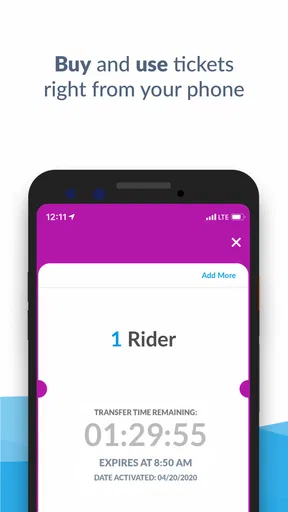
The Scan & Go approach is particularly useful when I want the final boarding step to be quick. Instead of making the entire journey depend on a longer exchange at the terminal, the app is designed around presenting a digital ticket for scanning. That does not remove every possible travel delay, but it changes the rhythm of the trip. I can prepare first and then concentrate on finding the correct ferry and getting on board.
My practical advice is to open the app before arriving at the dock, not while standing in a moving crowd. Buying or preparing a ticket in advance gives me time to notice whether I am on the right screen and whether the phone is ready to display the ticket clearly. This is a small habit, but it matters more than any flashy feature. A transport app is most helpful when it prevents a last-second scramble.
The first week is also when the app’s limited scope feels like a strength. I do not have to learn a complicated travel-planning system just to handle a ferry ticket. Someone visiting New York for a short stay can understand the basic purpose quickly. A local who uses the ferry occasionally can return to the same workflow without investing much time in learning the interface.
A realistic outing shows where it earns its place
Imagine I am meeting friends near the waterfront after work. I leave the office later than planned, walk toward the ferry, and do not want to stop and work out ticket details at the last minute. With the app, I can handle the mobile ticketing step while I am still on the way, then keep the phone ready for Scan & Go boarding. If the trip is part of a longer evening, that reduction in mental clutter is more valuable than it sounds.
The same workflow helps visitors who are unfamiliar with ferry travel. A first-time rider may already be balancing a map, street directions, and a changing schedule in their head. The app does not turn the ferry into a fully guided tour, but it can make the ticket portion less intimidating. I would still check the route and departure details separately and allow time to reach the terminal. The app is a boarding aid, not permission to arrive at the last second.
Families can also benefit from the phone-based approach, especially when one person is organizing the outing. The useful question is not whether the app replaces every ticketing need, but whether it lets the organizer keep the transaction and boarding information together. That can be easier than managing loose paper or asking each member of a group to handle the process independently.
The app is not a complete replacement for navigation tools
This is where I would set expectations early. If I am deciding between several ways to cross the city, I would still prefer a broader map or transit-planning app for the overall route. Those tools are usually better suited to comparing walking, subway, bus, and ferry options together. NYC Ferry’s advantage begins once the ferry is already part of my plan.
That distinction prevents disappointment. Someone looking for detailed sightseeing recommendations, broad city directions, or a single dashboard for every transport mode may find this app too specialized. I would use a general navigation tool to work out how to reach the terminal, then use the ferry app for the ticket and boarding part. The two roles complement each other rather than compete directly.
Month-to-month value depends on actual ferry habits
After the novelty fades, the app earns lasting space only if I take the ferry often enough for its focused workflow to matter. For a regular rider, repeatedly having mobile ticketing available can become a quiet routine: decide on the trip, prepare the ticket, arrive, scan, and board. That is the kind of recurring value I look for in a transport app. It does not need to entertain me if it reliably shortens a repetitive task.
For occasional riders, the value is more conditional. If I take one ferry trip during a holiday and do not return to the waterfront afterward, the app may feel like a temporary tool rather than a permanent part of my phone. That is not a flaw in the design; it reflects the narrow purpose. I would install it when a ferry trip is definite, use it for the outing, and decide later whether my travel pattern justifies keeping it.
The important long-term advantage is consistency. Paper tickets can be misplaced, and handling payment as an entirely separate step can make a simple journey feel fragmented. Keeping the ticketing workflow on the device I already carry makes repeat use easier. The benefit is modest on any single trip, but repeated modest benefits are exactly what make a utility app worth retaining.
I also appreciate that the app does not need to become a daily habit to be useful. Some travel tools are valuable because they are dependable when a particular situation appears. This belongs in that group. I would not judge it by how often I open it on an ordinary week; I would judge it by whether it makes ferry days smoother and whether I remember how to use it when the next ferry trip arrives.
Small workflow choices make a bigger difference than they seem
One useful habit is to prepare before reaching the boarding area, then keep the phone accessible rather than buried in a bag. This is especially practical when the waterfront is busy or when I am traveling with luggage. The Scan & Go design works best when the ticket can be presented without a long search through other apps, messages, or photographs.
A second tip is to treat the digital ticket as part of the journey plan, not as the plan itself. I would check the route, terminal, and timing using the appropriate travel information before opening the ticketing workflow. This division of labor reduces the chance of buying or preparing for the wrong part of a trip simply because the ticket screen was convenient.
A third insight is that the app is more useful for repeatable trips than for spontaneous exploration. If I already know which ferry I want, the focused process is efficient. If I am wandering around New York and merely wondering whether a ferry might be interesting, a broader map or city guide will help me make that decision better. In other words, the app supports execution more strongly than discovery.
Maintenance is light, but travel apps still need attention
The maintenance burden appears relatively low because the app has a clear purpose and a current version of 5.7.3. I would still keep it updated through the normal app-store process, particularly because ticketing and scanning are functions I do not want to test for the first time at a dock. A current app is not a guarantee that every journey will be effortless, but postponing updates can create avoidable uncertainty.
I would also avoid making the app the only thing I rely on for a time-sensitive trip. A charged phone is essential for any mobile-ticket workflow, and I would make sure the device is usable before leaving. If my battery is nearly empty, the convenience of a digital ticket becomes a vulnerability. This is not unique to NYC Ferry, but it is an important trade-off when replacing a physical ticket with a phone-based process.
Another maintenance question is storage. Because the app is free and its purpose is specific, keeping it installed is easy for a frequent ferry rider. For a visitor with very limited storage or someone who takes ferries only once, installing it when needed may be more sensible. The decision comes down to travel pattern rather than app quality.
I would not expect the app to replace checking current travel conditions through the appropriate official channels. Transport plans can change for reasons outside a ticketing app’s core role. The sensible routine is to use this app for the ticket and Scan & Go step while verifying the trip itself through reliable route and service information. That approach keeps the app in the role where it is strongest.
Where fatigue can appear over repeated use
The main source of fatigue is the app’s specialization. Once I have completed the ticketing task, there may be little reason to remain inside it. Users who prefer one application to handle route planning, real-time decisions, tickets, and broader city travel may find the separation inconvenient. I do not see that as a reason to reject it, but it does mean the app works best as one piece of a larger travel routine.
There is also a psychological cost to phone dependence. A digital ticket is convenient until the phone is difficult to access, the screen is hard to read in bright conditions, or the device is low on power. I would not describe these as reasons to avoid mobile ticketing altogether, but they are real trade-offs. The more important the trip, the more carefully I would prepare the phone before reaching the terminal.
Scan & Go can reduce boarding friction, yet any scanning process still depends on presenting the ticket properly and following the boarding flow. I would not assume that scanning means I can ignore instructions or arrive without enough time. The app streamlines a step; it does not remove the need for ordinary travel awareness.
Another possible fatigue point is installing a dedicated app for a journey that could be rare. A tourist who already has several city and transit apps may feel that one more download adds clutter. In that case, the decision should be practical: if mobile ticketing and Scan & Go make the ferry trip meaningfully easier, the installation is justified; if the trip is uncertain and the person prefers a single navigation tool, the dedicated app may not feel worthwhile.
Who should use it, and who should choose another approach?
I would recommend it most readily to New York residents who use the ferry repeatedly, commuters whose routes include a ferry, visitors planning more than one ferry outing, and anyone who dislikes handling tickets at the terminal. It is also a sensible choice for a group organizer who wants to prepare the travel step before the waterfront becomes crowded.
I would be more cautious recommending it to someone who is only comparing transport modes, because a general navigation app is better for that decision. I would also hesitate for a traveler who cannot depend on a charged smartphone during the trip. In that situation, the convenience of mobile ticketing may not outweigh the practical risk of relying on the device.
Compared with a general transit app, this one feels less broad but more directly focused on the ferry ticketing experience. Compared with handling a ticket through a more traditional process, it is more convenient when the phone is ready and the rider understands the boarding routine. Neither comparison makes it universally superior. The right choice depends on whether the reader values a dedicated ferry workflow or prefers to keep every travel task in one broader tool.
What remains useful after the novelty disappears
My long-term view is positive, but deliberately narrow. The app does not earn a permanent place on my phone because it is exciting. It earns that place when ferry travel is a recurring part of my life and the combination of mobile ticketing with Scan & Go saves me repeated effort. That is a durable reason to keep a utility app.
For occasional visitors, I see it as a trip-specific tool with a clear payoff. Install it before the ferry outing, prepare the ticket without rushing, and keep another navigation option available for the rest of the city journey. For frequent riders, the repeated workflow is more compelling: the app becomes a familiar preparation step rather than another piece of travel technology to think about.
Anchor Operating System has kept the product centered on a practical Travel & Local need, and the strong user response reflects how well that narrow purpose can work when it matches a real routine. I would not call it an all-in-one solution, and I would not use it as my only source of travel planning. But for the specific job of preparing an NYC Ferry ticket and moving through Scan & Go boarding, it is a useful, free companion.
In the end, NYC Ferry is worth keeping when ferry rides recur often enough that small savings in preparation add up. It is worth downloading for a planned outing when mobile ticketing will make the day less complicated. If ferry travel is only a vague possibility, or if I need one app to plan every part of a New York route, I would choose a broader alternative instead. Its lasting value comes from dependable repetition, not novelty—and for the right rider, that is exactly enough.
Verdict
Strengths of NYC Ferry
- Affordable fares compared with many city transport options
- Scenic views of Manhattan, Brooklyn, and the waterfront
- Bikes are allowed onboard, making waterfront trips more convenient
- Multiple routes connect neighborhoods underserved by subways
- Ferry terminals are generally easy to identify and access
Limitations of NYC Ferry
- Service can be delayed or suspended because of weather conditions
- Boats may become crowded during commuting hours and summer weekends
- Not every route runs frequently throughout the day
- Some terminals are far from major subway stations or attractions
- The app may not always provide enough detail about disruptions
Similar Picks in This Category
View All
Google Maps
Google LLC3.4

Google Maps Go
Google LLC4.1

Booking.com: Hotels & Travel
Booking.com Hotels & Vacation Rentals4.8

Google Earth
Google LLC3.8

Skyscanner Flights Hotels Cars
Skyscanner Ltd4.8

trivago: Compare hotel prices
trivago N.V.4.4
Frequently Asked Questions
What is NYC Ferry, and where does it operate?
NYC Ferry is New York City’s public water transportation service, connecting several waterfront neighborhoods across Manhattan, Brooklyn, Queens, and the Bronx, with seasonal or special routes depending on the current schedule. The service can be useful for commuting and sightseeing, but routes, stops, and departure times may change, so checking the app before traveling is recommended.
How can the NYC Ferry app help me plan a trip?
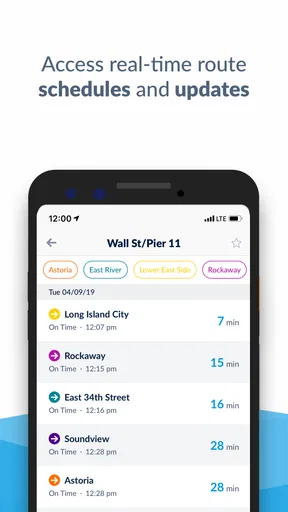
The NYC Ferry app is designed to help passengers view routes, locate nearby terminals, check schedules, and plan journeys between available landings. Before boarding, I recommend confirming the selected route and departure time because ferry frequency can vary by line, day, season, weather conditions, and service updates. The app is especially helpful for comparing terminals and planning connections.
How much does an NYC Ferry ride cost, and can I buy tickets in the app?
NYC Ferry fares and ticket options can change, so passengers should review the current prices displayed by the official service before traveling. Depending on the available features, the app may provide information about purchasing or managing tickets, while ticket machines and other approved payment methods may also be available at terminals. Check fare rules, transfer conditions, and ticket validity carefully.
Can I bring luggage, bicycles, or pets on NYC Ferry?
NYC Ferry generally accommodates everyday personal belongings, and bicycles may be allowed subject to space, safety requirements, and crew instructions. Large luggage, crowded sailings, or special equipment can affect boarding, so passengers should review the latest policies before arriving. Pets may also be subject to specific restrictions, with service animals treated according to applicable accessibility regulations.
Is NYC Ferry reliable during bad weather, and is the service accessible?
NYC Ferry can be affected by strong wind, heavy rain, fog, ice, or other conditions that make marine travel unsafe. Delays, cancellations, and temporary terminal changes are possible, so checking alerts shortly before departure is important. The service aims to support passengers with accessibility needs, but terminal conditions and vessel boarding arrangements can differ by location.
